RUSH/LEAK-REMEDIATION WORK ORDERS – DEFINITION
Leaks (or potential leaks) and remediation are the first priority of Community Care. The Community Care Work Order Specialists run a special report for these work orders daily so that the progress of the work can be monitored very closely. There are 2 main types of leaks that pose extreme threats to the health, safety, and property of homeowners/residents:
- Gas leaks (or potential gas leaks). Because of the extreme flammable nature of gas, any report of a gas leak/potential gas leak must be dealt with promptly. Follow up must be a top priority. Gas leak work orders are given the Priority Code Rush-Leak/Remed and receive daily follow up. They do not typically require remediation or interior repairs. (See below “Gas Leaks” for further information on handling this type of leak).
- Liquid leaks (or potential liquid leaks). Must be given the Priority Code – Rush-Leak/Remed. Examples are: roof leaks, plumbing drain leaks, slow moving drains (potential back up of sewage/black water), slab leaks, hot or cold water pipe leaks, irrigation hitting a building that could allow water to penetrate into the interior (a sprinkler shooting into a door or window, a sprinkler saturating stucco, etc –please also reference SOP #315: Specific Work Order Issues/ After Hours Parking and Towing Issues/ After Hours IT Issues for irrigation leaks). To qualify as a Rush/Leak-Remed liquid leak/potential liquid leak work order, both of the following must be true:
- It is in or affecting a building
- It could potentially lead to mold/remediation (mold, sewage damage, etc.)
HOW LIQUID LEAKS/POTENTIAL LIQUID LEAKS ARE HANDLED:
The 3-step process for handling any liquid leak/potential liquid leak in or affecting a building that could lead to mold/remediation must be followed every time a liquid leak/potential liquid leak is reported. It is essential that the process move quickly from one step to the next.
Note that this procedure does not apply for associations that are RED in SnapHOA Management (associations with onsite management) See SOP 301 – Emergency Rush Calls for instructions on opening rush work orders for those RED associations.
- Step 1: Stop the leak
- Gathering Leak Information
- Opening a Leak Work Order
- Updating a Leak Work Order
- Following up on a Leak Work Order
- Closing a Leak Work Order
- Step 2: Dryout/Remediation
- Opening a Remediation Work Order
- Updating a Remediation Work Order
- Following up on a Remediation Work Order
- Closing a Remediation Work Order
- Step 3: Interior repairs (build back)
- Opening an Interior Repair Work Order
- Updating an Interior Repair Work Order
- Following up on an Interior Repair Work Order
- Closing an Interior Repair Work Order
STEP 1: STOP THE LEAK (Plumbing-supply line and drain lines, Roofing, Windows, sprinklers hitting a building/saturating stucco/going into an open door or window, etc.)
When a leak/potential leak is reported, **check the profile** to see if the leak is association responsibility and if there are any specific instructions regarding handling these work orders. If it is an HOA responsibility, then proceed with the following process:
**Special note regarding neighbor-to-neighbor leaks and water intrusion: If a leak is determined to be H/O responsibility and it affects a neighboring unit(s), advise all parties involved that the leak, remediation, and interior repairs are the responsibility of the H/O who is responsible for the source of the leak. Suggest that they may want to get their homeowner’s insurance involved. If any H/O involved contacts us to complain that they are not getting an adequate response from the responsible H/O, they should put their dispute in writing to the manager to bring to the attention of the BOD so that a reasonable investigation can be conducted and a decision be made to intervene or not to intervene.
- Gathering Leak Information
- Caller’s name and phone number along with the names and contact information for any additional parties concerned (i.e. spouse of caller, tenant, neighbor who will provide access, real estate agent who will provide access, etc.).
- Ask for a complete description of the leak including (as applicable):
- Type – gas/liquid? (If gas – see “Gas Leaks” below)
- Use MU/Single Unit Leak Outline Form
- Location
- Approximate size of the leak and amount of liquid?
- What is located adjacent to the leak?
- If there is an adjacent unit, what is the address or unit number?
- When was the leak first noticed?
- Is there an obvious source of the leak?
- If there is an adjacent unit, have they been contacted?
- Has the water been turned off?
- Opening a Leak Work Order
- If the leak affects only one unit, open the work order under the property address.
- If the leak affects multiple units, open the work order under the common area.
- Remember: If a leak may be affecting multiple units, community care needs to reach out to all the affected units. The vendor should not be the first person to notify them.
- Contact Name/Contact Method – any additional contacts for the unit should be included in the “Notes” section along with the contact information for the person reporting all.
- Description – If the leak affects multiple units the description line of the work order should indicate that it is a “MU” (multiple-unit) work order. For example: “MU 101/102.” For single unit leaks, the description should enhance the “Type” information.
- Type – Choose Gas, Plumbing (Int/Ext), Roof (Repair/Leaks), Water Intrusion, Windows (Leaks/Rep), Irrigation, Sewer, or other applicable category. Ask for assistance if you are not sure which to choose.
- Priority Code – Rush-Leak/Remed (LEAK)
- Due Date – SnapHOA Management app should automatically change the due date to the next business day when Rush-Leak/Remed (LEAK) is selected, but please confirm.
- Details: Using the information gathered, write a brief description of the issue and request that the vendor go out as soon as possible to inspect and advise.
- Notes: Enter any additional contact names (with relationship to property in parentheses), addresses, and contact information for the unit(s) involved.
- Fax or email the work order according to the profile and document that you did so.
- After sending, call the vendor to confirm receipt of the work order. Document the name of the person you spoke to on the work order.
- If possible, get an estimated time of arrival.
- If the issue was reported online, contact the homeowner/resident to confirm receipt and document.


- Updating a Leak Work Order
- When the work order only involves one unit, pull up the work order by pulling up the homeowner’s/resident’s address and NOT by work order #. This will allow you to see where we are in the 3-step process. When the work order involves more than one unit, search for the work under common area work orders in the SnapHOA Management App.
- Be certain you are updating the right work order. Notes regarding remediation and interior repair belong in separate work orders under the individual property address(es).
- Due Date – Change to the next business day or other applicable business day date provided by the vendor or manager.
- When the vendor calls back to get approval for work to stop the leak:
- Obtain the vendor’s name, call back number, scope of work, and estimate.
- If the vendor says they must talk to the manager to explain the details, transfer the call, but chat or email the manager to ask what was approved so that you can document the work order.
- Contact the manager IMMEDIATELY for approval.
- If the manager’s EIO indicates they are in the office: 1) Call his/her Extension. 2) Chat through Zoom. 3) Call his/her cell. 4) Send a text to their cell. If they do not respond to any of the above attempts, escalate the call to the Sr. Manager (or another Sr. Manager if the Sr. for that HOA is not available) or ask a Community Care Lead for assistance.
- If the manager is not in the office call them on their cell (as long as they are not sick or on vacation). If they do not answer, leave a message with the details and let them know you are escalating the call to the Sr. Manager (or another Sr. Manager if the Sr. for that HOA is not available).
- Ask vendor if remediation and/or interior repairs will be necessary in any of the units affected. If yes, then open the remediation and/or interior repair work order(s) immediately under the individual property address(es) (NOT common area). Document that you have done so in the leak work order.
- Confirm the number of units affected. If the work order was opened under a single property address and the vendor reports that more than one unit is involved, change the work order to common area and add contact info for all units involved.
- If the vendor indicates that the water is being shut down to make the repair (and the water will be shut-off for more than one unit), immediately open a common area work order for water shut-off. Note in the leak work order that you have done so.
- If anyone calls with an update (homeowner/vendor/resident, etc.) gather information and include as many details as possible. Reference their name.
- Contact all homeowners, tenants, etc. listed in the work order to provide update(s).
- When the work order only involves one unit, pull up the work order by pulling up the homeowner’s/resident’s address and NOT by work order #. This will allow you to see where we are in the 3-step process. When the work order involves more than one unit, search for the work under common area work orders in the SnapHOA Management App.
- Following up on a Leak Work Order
- The Community Care Work Order Specialist Team runs a daily report of all Rush-Leak/Remed work orders that are due on that day to ensure we address the issue in a timely manner. We must contact the homeowners/tenants/residents every single time you touch a Rush/Leak-Remed work order pursuant to the below (and see SOP #306: Follow Ups)
- The Escalation process for Following up is as follows: (Please see 205 Scripts)
- 1st Follow Up: Call Vendor/Call or chat Mgr – Call Owner
- 2nd Follow Up (if no response): Call Vendor/Mgr. If assigned to vendor escalate to Mgr. If assigned to Mgr, escalate to Sr Mgr.
- 3rd Follow Up (if no response): Call Vendor/Mgr. If no response, escalate to Mgr., Sr. Mgr, and Liz, Call Owner
- 4th + Follow Up: Continue escalating to all.
- Follow the above steps to update the work order.
- Closing a Leak Work Order
- Pull up the work order through the methods above (work order # or address as stated above).
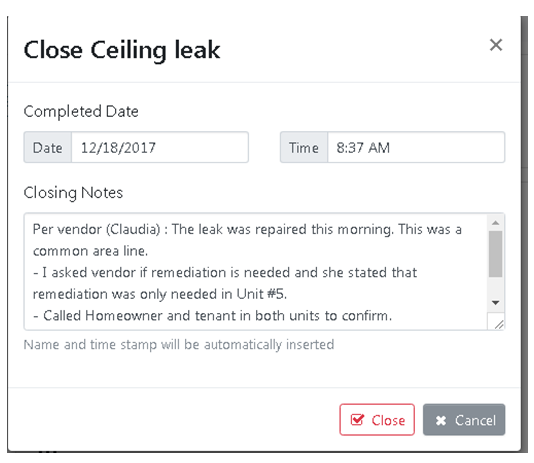
- Notes – Click on the “Close” button and state reason for closing in the closing notes window that comes up (i.e. “Vendor states slab leak has been repaired.”) Reference all contacted individuals by name. If referencing the manager at any point, make sure you use the manager’s name in the work order.
- Call all owner, tenants, etc. to follow up and document in the work order. If you get a voicemail, state that you left a message to follow up and close out the work order.
- Indicate if you are opening a work order for the next step in the process for any of the units involved.
- Indicate in the notes that you are closing the work order. (***CLOSING***)
- When you save your notes in the Close work order window, the work order will be closed.
- If it has not already been done, open a work order for each unit involved to complete the next step (remediation or interior repair). NEVER CLOSE A LEAK WORK ORDER WITHOUT CHECKING TO BE SURE THAT THE NEXT STEP (IF NECESSARY AND COVERED BY THE HOA) IS BEING TAKEN CARE OF FOR EACH UNIT.

STEP 2: DRYOUT/REMEDIATION When remediation (mold removal, sanitizing sewage damage, or dryout) is required, check the profile to see if the leak is association responsibility and if there are any specific instructions regarding handling these work orders. If it is HOA responsibility, then proceed with the following process:
- Opening a Remediation Work Order
- No “MU” (multiple-unit) work orders should be opened for remediation. A separate work order should be opened for every unit affected, under each individual address.
- Contact Name/Contact Method – any additional contacts for the unit should be included in the “Notes” section. See below.
- Type – Remediation/Mold/Dry.
- Priority Code – Rush-Leak/Remed.
- Due Date – Change to next business day.
- Notes:
- Include the leak work order number for reference.
- Next, put the names and contact information of any tenants, residents, or owners (their relationship to the property in parentheses) in the work order (you should be able to copy this from the leak work order). This is only necessary if there is more than one contact as the main contact info should go in the General Information section (Contact Name/Contact Method).
- Using information from the leak work order, provide a brief summary of the reason for water intrusion and the location(s) affected or potentially affected within the unit. Instruct the vendor to inspect and advise.
- Fax or email the work order according to the profile instructions and document that you did so in the work order.
- After sending, call the vendor to confirm receipt of the work order. Document the name of the person you spoke to.
- If possible, get an estimated time of arrival.

- Updating a Remediation Work Order
- Due Date – Change to the next business day.
- Notes –Be sure you are adding notes to the right work order. Only add notes regarding remediation/dry out.
- When a remediation vendor calls to get approval, get the vendor’s name, call back number, scope of work, and the amount of the estimate before contacting the manager.
- If the vendor says they must talk to the manager to explain the details, transfer the call to the manager, but chat or email the manager to ask what was approved so that you can document the work order.
- Contact the manager IMMEDIATELY for approval. Follow the same escalation procedure as that for leaks, if needed.
- Ask vendor if interior repairs will be necessary following remediation and document that in the work order.
- If anyone calls with an update (homeowner, vendor, resident, etc.), gather information and include as many details as possible. Reference names of all reporting individuals.
- Contact all homeowners, tenants, etc. listed in the work order to provide update(s).
- Following up on a Remediation Work Order
- The Community Care Work Order Specialist Team follows the same follow-up process as they do on the original leaks.
- Follow the above steps to update the work order.
- Closing a Remediation Work Order
- Pull up the work order as usual.
- Notes – Click on the “Close” button and state the reason for closing in the closing notes window that comes up (i.e. “Vendor (NAME) states remediation has been completed and area is dry and ready for interior repairs”). If referencing the manager at any point, make sure you use the manager’s name in the work order.
- Call all owner, tenants, etc. to follow up and document in the work order. If you get a voicemail, state that you left a message to follow up and close the work order.
- Indicate if you are opening a work order for the next step in the process.
- Indicate in the notes that you are closing the work order. (***CLOSING***)
- When you save your notes in the Close work order window, the work order will be closed.
- If interior repairs are necessary, open a work order. NEVER CLOSE A REMEDIATION WORK ORDER WITHOUT CHECKING TO BE SURE THAT AN INTERIOR REPAIR WORK ORDER HAS BEEN OPENED (IF NECESSARY AND IF COVERED BY THE HOA).
STEP 3: INTERIOR REPAIRS
Once the leak was determined to be HOA responsibility a work order should have been opened immediately for any necessary interior repairs that were covered by the HOA. When the leak work order or the remediation work orders are closed a final check should always be done to be sure the interior repair work order was opened. Although the repairs should be completed in a timely manner, they are not considered an emergency
- Opening an Interior Repair Work Order
- No “MU” (multiple-unit) work orders should be opened for interior repairs. A separate work order should be opened for every unit affected.
- Contact Name/Contact Method – any additional contacts for the unit should be included in the “Notes” section. See below.
- Priority Code – Normal-Comm Care.
- Type – Interior Repair
- Notes – If there is more than one contact person for the work order start with the usual header (name, contact info and relationship to the property). This header may be omitted if there is only one contact person.
- Instruct vendor to provide bid for interior repairs resulting from a leak. Note the areas of the unit affected/potentially affected.
- Include the leak work order number for reference.
- Document in the work order that the work order was either faxed or emailed to the vendor.
- If the resident/owner asks how long the interior repairs will take, state that the emergency situation is resolved (the leak has been stopped and the area dry and mold-free) and we will make every attempt to completed the interior repairs in a timely manner. Internal information: Most board of directors require a bid (and sometimes one or more competitive bid) for interior repairs. The bids are usually reviewed by the board during their next meeting. See manager for details).

- Updating an Interior Repair Work Order
- Notes:
- Update as you would a standard work order.
- If the update provides a time-frame for completion, reset the due date to a day or two after the scheduled date of completion.
- If your update involves information from the vendor or manager and the owner/resident has been called to be updated, re-set the follow up date to one week from the update.
- Notes:
- Following up on an Interior Repairs Work Order
- The Community Care Work Order Specialist Team runs a daily report of all work orders that are due on that day.
- The Escalation process for Following up is as follows: (Please see 306: Follow Ups and see SOP 205 – Scripts)
- 1st Follow Up: Contact Vendor (per profile instructions)/ E-mail Mgr. – Call Owner
- 2nd Follow Up: Contact Vendor (per profile instructions)/ E-mail Mgr. – Call Owner
- 3rd Follow Up:
- If assigned to Vendor: If no response was received during the last 7+ days from both the vendor or owner, please close work order with note “Closing W/O due to no further update”. No need to call owner again. If correspondence was received within the last 7 days, go back to 1st Follow Up and repeat process.
- If assigned to Mgr: If no response was received during the last 7+ days Call/chat Mgr for status. If no response, please escalate to Sr Mgr. If correspondence was received within the last 7 days, go back to 1st Follow Up and repeat process.
- 4th Follow Up: Call Vendor/Call Sr Mgr. If no response from vendor, escalate to Mgr. If no response from Sr Mgr., E-mail Liz. – Call Owner
- 5th Follow Up:
- If assigned to Vendor: If no response was received during the last 7+ days or since the last update from both the vendor or owner, please close work order with note “Closing W/O due to no further update”. No need to call owner again. If correspondence was received within the last 7 days, go back to 1st Follow Up and repeat process.
- If assigned to Mgr: If no response was received during the last 7+ days Call/chat Mgr for status. If no response, please escalate to Sr Mgr. If correspondence was received within the last 7 days, go back to 1st Follow Up and repeat process.
- 6th Follow Up: E-mail Mgr, Sr. Mgr., & Liz.
- Pull up the work order by work order number or address.
- Update as above.
- Closing an Interior Repair Work Order
- Pull up work order as usual
- Notes – Click on the “Close” button and state the reason for closing in the closing notes window that comes up (i.e. “Vendor (Name) states interior repairs have been completed”). If referencing the manager at any point, make sure you use the manager’s name in the work order.
- State reason for closing.
- Call all owner, tenants, etc. to follow up and document in the work order that you have done so. If you get a voicemail, state that you left a message to follow up and close.
- Indicate in the notes that you are closing the work order. (***CLOSING***)
- When you save your notes in the close work order window, the work order will be closed.

GAS LEAKS/POTENTIAL GAS LEAKS
HOW GAS LEAKS/POTENTIAL GAS LEAKS ARE HANDLED:
- If a resident reports the smell of natural gas or a broken gas line, then a work order with the priority code Rush-Leak/Remed (LEAK) must be opened pursuant to Community Care standards. The “Type” selected should be Gas (GAS) and the “Description” should identify the location of where the smell of natural gas and/or broken gas line is. Please confirm the following with the resident and add to the work order accordingly:
- Caller’s name, phone number, relationship to the Association
- When the smell of natural gas and/or the broken gas line was first noticed?
- Strength of the smell (Very strong, faint, etc).
- The location of the broken gas line AND/OR where the resident was when he or she smelled/noticed the natural gas.
- If the resident is in a common area, then ask the resident to provide nearby building addresses or other identifying areas within the community (parking structure, pool, club house, tot lot, etc). This is necessary to direct the vendor quickly and appropriately.
- Whether the resident hears any unusual sound such as a hissing, whistling, or roaring noise which could possibly be connected with the gas leak/potential gas leak.
- Ask the resident to evacuate the immediate area for his/her safety.
- If the resident reports a visible broken line – cones or caution tape may need to be put up. Open a separate work order for this request. Confirm with manager if necessary.
- If the odor is coming from a BOILER ROOM, the boiler vendor should be asked to go out ASAP. If they are not available, call the public utility vendor that provides gas service.
- If the odor is coming from the POOL PUMP ROOM, ask the pool vendor to go out ASAP. If they are not available, call the public utility vendor that provides gas service.
Per SOP 315, subsection regarding work orders for public utilities: When opening a work order for a public utility company (such as Southern California Gas or Pacific Gas and Electric) do NOT fax or email the work orders (unless the profile specifically says to do so – you must also remember to confirm receipt). Contact by phone (for emergencies) and document in the work order how you contacted, who you spoke to, etc. Non-emergency work orders for public utility companies can be reported via phone or internet.
SPECIAL NOTES FOR RAIN RELATED LEAKS
- This may sound obvious, but rain related leaks
only occur when it’s raining. If the
leak doesn’t start when the rain starts and stop shortly after the rain stops,
you should suspect another source. Don’t
assume! Ask all of the leak diagnostic questions. - Be sure to check the profile. Not all roof leaks, window leaks, deck leaks,
etc. are HOA. - Roof leaks usually only affect the area directly
under the roof. However, occasionally
water will travel to lower areas within the home. If a leak is manifesting itself in an area of
the home that is not directly under the roof, you should explore the
possibility that the leak is from another source (plumbing? Heater?
Window?). - One sneaky culprit that often disguises itself
as a roof leak is a deck/balcony leak (which is often h/o responsibility). Be sure you are asking, “What is adjacent to
the area where the water is entering the unit?” - Roofers rarely schedule with h/o – they usually
just go directly to the suspected leak.
Don’t create the expectation in the owner’s mind that they will be
notified by the roofer. - Roofer will not typically enter the unit to
observe the interior damage. We are
dependent upon the resident to describe the extent of the damage. You must include that information in the leak
work order so that later we can send a remediation or interior repair vendor. - Roofers will not usually get on any roof
(especially a slippery tile roof) when it is raining. - If the roof is on a 3rd story or
above you must mention that in the w/o.
Special equipment is usually required to get to any roof higher than the
2nd story. - Some associations will approve “Tarping” as a
temporary solution while the roofer prepares a bid for permanent repairs. If approved tarping is to be done by a
different vendor than the association’s approved roofing vendor, an additional
Rush/Leak work order must be opened. If
the HOA roofer is doing the tarping the info about tarping can be included in
the roof repair work order - If a resident reports that their ceiling is sagging
because water is collecting, ask them to put a bucket under the lowest point
and puncture the ceiling with a pen.
This will allow the water to drain and avoid having the ceiling
collapse. - Ask residents to move furniture and their
personal items to protect them from damage and place buckets or other
containers under leaks whenever possible. - Dryout CANNOT begin until at least a temporary
fix or tarping has been done (otherwise the rain will just wet the area
again). - If a resident says they are going to unplug
drying equipment (for any reason) document the w/o indicating that you have
instructed them not to do so. - When closing a rain leak work order (leak has
been permanently repaired), always check to see the extent of water damage and
or interior damage and open the appropriate remediation or interior repair work
order at that time. - We will open the Interior Repairs work order
only after the permanent roof repairs are completed. - Saturated drywall will not dry on its own so it
will need to be removed and the area
dried out, but a small “stain” on the ceiling or wall can typically just be
painted over.