- Only Speak to the Homeowner *** VERY IMPORTANT***
- Written consent to speak to non-owner
- Deceased owner
- Payment info for non-owners
- Caller claims to be on title
- Caller is on title but has new name (married/divorced, etc.)
- New homeowners
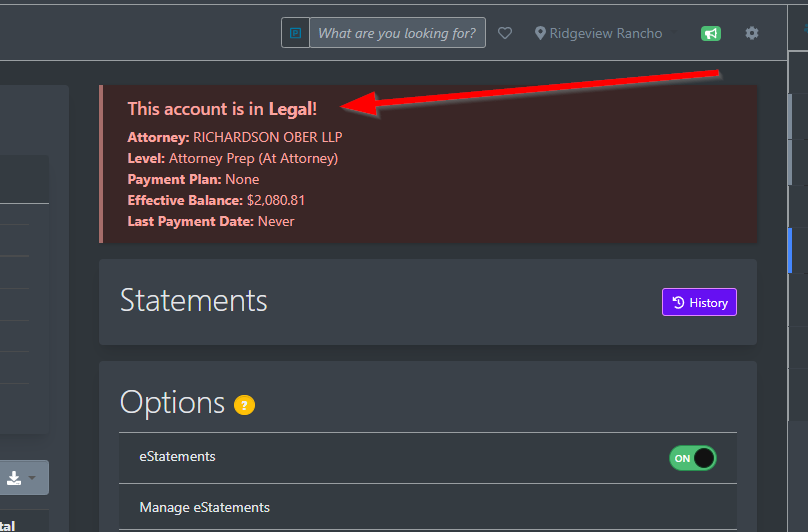
- Check Account Status – Legal ***VERY IMPORTANT***
- Check for Special Assessments ***VERY IMPORTANT***
- Requests to Waive Late Charges, Interest, and Other Fees
- Explanation of Account Balance/Requests for Breakdown of Account Charges, etc.
- Questions about Misc Charges/Fines and Fees
- Documenting Calls
- Communicating With Accounting
Community Care is designed to provide homeowner’s with up-to-date and accurate information about their account. Owners may also get their current account information on the Resident Portal website. (http://resident.actionlife.com)
- ONLY SPEAK TO THE HOMEOWNER – Before speaking to a caller regarding an account please verify that they are the homeowner. We can only speak to the owner(s) on the title of the property (our records will only reflect owners on the legal title). This includes, but is not limited to, giving the caller the account balance or stating that the account is in legal status.
- We can only release account information (balance, legal status, etc.) to a non-owner with the written consent of the owner. If written permission is received it could appear in one of two places.
- 1. Under the unit tab for that individual owner and click on attachments.
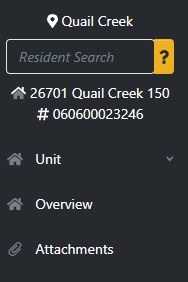
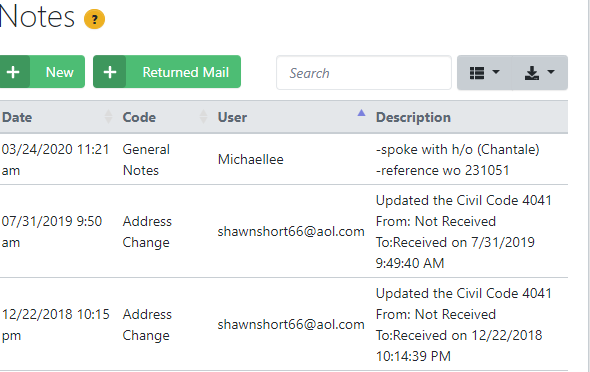
- 2. Under the individuals address, go to unit “Notes” section
- If the owner is deceased, a copy of the death certificate should be sent to EscrowClosings@actionlife.com as well as a legal document indicating who will be handling the account for the deceased (executor, attorney, etc) or a legal document showing the current owner. Provide mailing address for payment and ask them to write the property address in the memo line of the check so that there will not be an interruption in payment.
- We may provide the mailing address for payments to non-owners and tell them the amount of the monthly payment (not the current balance). Do not provide the account number. Instruct them to write the property address in the memo line of the check.
- If the caller claims to be on the title but their name does not appear in our records (for example: Mary Smith calls and the account is under Bob Smith only), ask them to send a copy of the recorded deed so that we can update our records. If they are unwilling to send it or do not have it available, email EscrowClosings@actionlife.com and ask them to check the title of the property and update SnapHOA Management.
- If a caller is on title but states that they now have a new name (married/divorced, etc.). We cannot change our records to reflect the new name unless the owner has the title updated (submitting a marriage/divorce certificate is not adequate). Request that they send a copy of the updated title to escrowclosings@actionlife.com so that we can change our records.
- If the caller is a new owner and the account is showing up under the previous owner’s name, let them know that our Escrow department must receive the closing packet from their escrow company before we are able to set up their new account.
- Note: The new owner is responsible for the first full month after they close escrow. We always request that the new owner pre-pay 2 months’ dues during escrow, so they will not receive late charges while the account is being set up.
- We can only release account information (balance, legal status, etc.) to a non-owner with the written consent of the owner. If written permission is received it could appear in one of two places.
- CHECK ACCOUNT STATUS – After verifying that you are speaking to the homeowner, check the account status. There are 2 places to check to see if account is in legal status
- First, there is a big red banner that appears at the top of the Snap HOA Management as soon as you pull up the address stating the account is in Legal Status.
- The second you can see when you go to the accounting tab and look in the area of account information on the right hand side The legal box will be checked. If the account is in legal status, do not provide the caller with any information regarding the account including the account balance. Provide them with the name and number for the collection attorney listed on the associations profile (if there are several listed then you should verify with the appropriate collections rep.) All further communication regarding the account must be addressed through the attorney. Occasionally an account may be marked “Legal,” but the “Collection status will contain the code, “TA,” (Transitioning Account, Enroute to Attorney). This means that file has not been sent to the attorney yet and the caller may be warm transferred to the appropriate Collections Rep here at Action (see screen shot below). If the account is in “Collection” see SOP406 Collections for call handling information.
- CHECK ACCOUNT FOR SPECIAL ASSESSMENTS – After verifying that you are speaking to the homeowner and checking the account status (and having determined they are not in “legal” status), check to see if there is a Special Assessment on the account (Go to the accounting tab and look on the right hand side for recurring charges. Because the accounting for Special Assessments can be very complex, please DO NOT ATTEMPT TO ANSWER ACCOUNTING QUESTIONS FOR ACCOUNTS WITH SPECIAL ASSESSMENT. Only general information questions should be answered by Community Care: More complicated questions should go to the Community Manager.
- Examples of general questions that can be answered by CC:
- “Where to I mail my Special Assessment payment?” (Irvine Office)
- “Was my Special Assessment check received?” (It gets applied to their ledger)
- “Was the check I sent applied to my Special Assessment balance?” (Special assessments are added to their ledgers so you should be able to see that.)
- “Was the Late Charge I received for my regular assessment or for the Special Assessment?”
- Examples of questions which should NOT be answered by Community Care (Give CM email/Xfer to CM):
- What is the Special Assessment for?” (It is usually listed on the notice they received so if they still have questions, the manager will need to assist.)
- “What are the payment options?” (It is usually listed on the notice they received so if they still have questions, the manager will need to assist.)
- “What is the balance I still owe on my Special Assessment?
- Examples of general questions that can be answered by CC:
- REQUESTS TO WAIVE LATE FEES, INTEREST CHARGES AND OTHER CHARGES WAIVED – Community Care is a resource for account “information” only. We do not have authority to waive late charges or other fees.
- Owners wishing to have late charges and/or fees reversed off their account must email the Fee Waiver Request Form request to communitycare@actionlife.com . Please let them know to fully fill out the form and to include the amount they are requesting be waived along with the reason for their request so that it can be presented to the board for consideration during their next board meeting. Let them know that they will receive a response to their request in writing from the board after it has been reviewed.
- If the manager determines that the charge was applied in error, they will contact our Accounts Receivable (A/R) Department.
- If the manager determines the charge was not applied in error the manager will present the homeowner’s written request for waiver to the Board of Directors so they may consider their appeal at their next meeting (see SOP 404 Late Charges and Interest Charges and SOP 406 Collections). The homeowner will receive a written response from the Board after the meeting. Note: Occasionally a manager or General Manager has been authorized by the Board to waive some charges (for example, one LC per homeowner per year) HOWEVER, this should never be disclosed to the caller.
- If the account is in Pre-Lien or Lien Status, the h/o should carbon copy the Collections Rep. for that association on the written request for fee waiver so that the account can be flagged. Once the dispute/appeal is received, the collection process is temporarily suspended until the board has had an opportunity to consider it.
- EXPLANATION OF ACCOUNT BALANCE/ REQUESTS FOR BREAKDOWN OF ACCOUNT CHARGES, ETC. If a homeowner’s account is complex and Community Care is unable to explain charges, open an Accounting Support Ticket and ask that they contact the homeowner. If the homeowner wants an immediate answer, and an accounting ticket has already been opened BUT the situation remains unresolved after more than a week, you may warm transfer to a Cash Postings representatives, (See Knowledge Base for names of individuals), or Kevin Flessing. When you open the Accounting Support Ticket, document your request in the Notes section of the address. Make sure to include h/o’s name, account number, address, and contact information in the accounting ticket. Additionally, it is helpful to attach a screen shot of the homeowner’s account ledger. The Accounting Department will follow up with the homeowner.
- QUESTIONS ABOUT MISC CHARGES /FINES AND FEES – If a homeowner has been charged a miscellaneous fee, or a fine, and they want to know what the charge is for, please do not open a support ticket and instead, refer the question to the Community Manager. Accounting is unable to assist.
- DOCUMENTING CALLS – All conversations with a homeowner should be documented in the Homeowner’s account in the Notes Section (Homeowner Account –> Unit –> Overview –> Notes). Any support ticket opened regarding the account should also be recorded in the notes section.
- COMMUNICATING WITH ACCOUNTING
- Any complex accounting issues beyond normal inquiries will escalate to Accounting. (Cash Posting)
- Open a support ticket
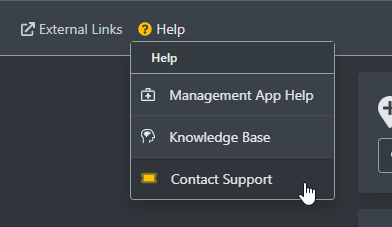
- Select Accounting Help
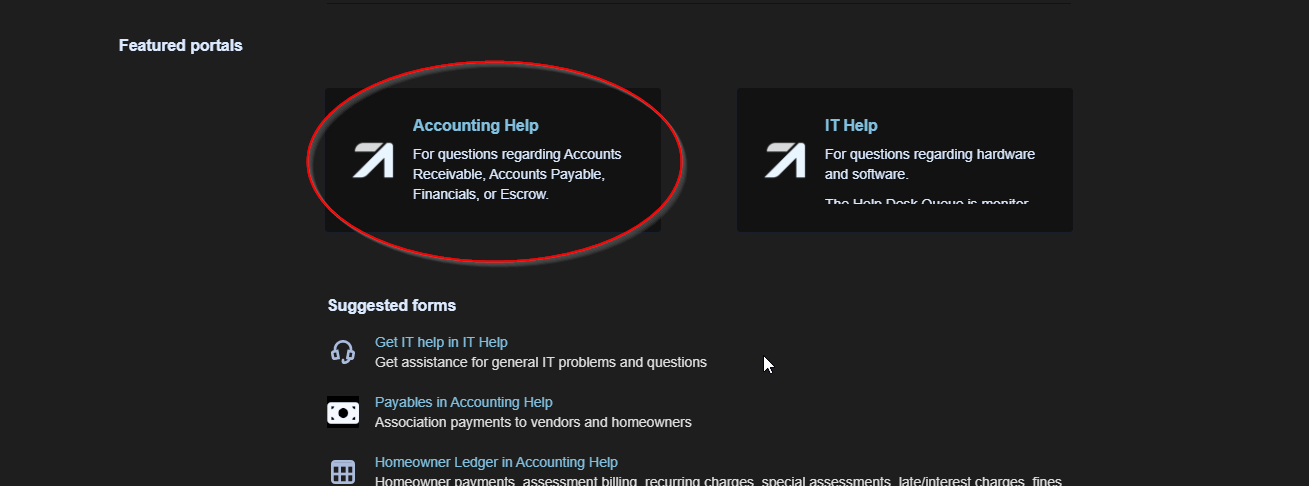
- Document the accounting call or email in the Notes section of the h/o after opening Accounting Support Ticket.
- Include the account number, address, homeowners name, any attachments, and what the issue is in the ticket. If you are asking cash postings to reach out to the homeowner, please ensure you include the homeowner’s contact information as well. Follow up should always be from Accounting, not Community Care, in case the homeowner has additional questions.