Red Associations Definition:
An Association is “Red” if they have a red bullhorn symbol  next to the profile in Mgmt app. The red indicates that Community Care does not open or follow up on work orders for that association. However, here are a few exceptions:
- Homeowner creates a work order on the Resident Portal. When this happens assign the work order to the “Manager” and forward it to the GM and their Assistant. We respond to the owner/resident through the Management App using the “Resident Portal: W/O Response – Red HOA” template to let them know you have done so and that they will follow up.
- A call is received after hours regarding an emergency situation and Community Care needs to document actions taken to assist (only after following the instructions on the On Call Tab). If the Management App has a work order tab a work order can be created. However, it should be noted that most red associations do not have a work order tab so no work order can be created.
- The GM or Sr. Manager ask if Community Care can (on a temporary basis) open work orders to assist their Team.
If one of the exceptions above is made, please be sure to assign the work order to “Normal-Onsite” or “Rush-Onsite” Only. You would also leave the work order OPEN.
Types of Red Associations:
- TYPICAL ONSITE “RED” ASSOCIATIONS – The majority of red associations have 24/7 staff (security, concierge, front desk, etc.) onsite to meet the immediate needs of the residents and the residents contact them directly for assistance. They are often in high-rise or mid-rise buildings.
- The Community Manager is always referred to as the General Manager, or “GM.” This title distinguishes them from portfolio managers.
- The GM is not on the EIO. He/she should be reached at the onsite office number displayed on the Dashboard Overview on Mgmt App during their office hours. For non urgent calls the caller should leave a VM for the onsite office. For emergency calls follow the instructions on the On Call Tab in Mgmt App.
- Homeowners from Red Associations rarely call Community Care. However, when they do call is usually for one of the following reasons:
- Questions about billing.
- Escrow questions.
- Complaints about the GM (call is warm transferred to Sr. Manager or provide email address for Sr.).
- Maintenance or emergency issues (outside of the onside office hours). ***IF YOU RECEIVE A MAINTENANCE/EMERGENCY CALL FROM A RED HOA, OBTAIN AS MANY DETAILS AS POSSIBLE THEN CHECK THE MANAGEMENT APP ASSOCIATION “ON CALL” TAB FOR THE ESCALATION CONTACTS LIST FOR THAT HOA. IF YOU ARE UNABLE TO REACH ANY OF THE CONTACTS, ASK FOR ASSISTANCE IMMEDIATELY. ***
- ATYPICAL ONSITE “RED” ASSOCIATIONS – Some red associations have a GM that is only on-site during certain office hours or only on-site a few days a week. All of the information for the “Typical On-site” that is listed above applied also to the “Atypical On-site” (except, of course, that they do not have 24/7 on site staff). We receive more maintenance/emergency calls for the Atypical Red Associations than Typical Red Associations since emergencies arrive outside of the GM office hours. The calls should be handled as explained above.
- COST CENTERS – Cost centers are usually “red” on Lookup because we do not open work orders for most cost centers. However, there are a few that are “green” or “yellow.” The color code and profile will always inform you when, if ever, we open work orders under a cost center.
- Cost centers are not associations or sub-associations. They are not separate legal entities and do not have separate CC&R’s, Rules and Regulations, Articles of Incorporation, etc. Therefore, it is never necessary for anyone to obtain escrow documents for cost centers.
- A cost center is sometimes set up so that when only some units in an association enjoy “special amenities” that the other units do not (Examples: larger or more greenbelts, additional parking, etc.) those units can be charged for the expense for those amenities. [We in Community Care are not given a list of those amenities. Questions about what is covered go to the community manager.] H/O’s that live in this type of cost center pay their normal HOA monthly assessment plus an additional assessment for the cost center. The cost center assessment is usually included on the same billing statement at the HOA normal monthly assessment. See example:
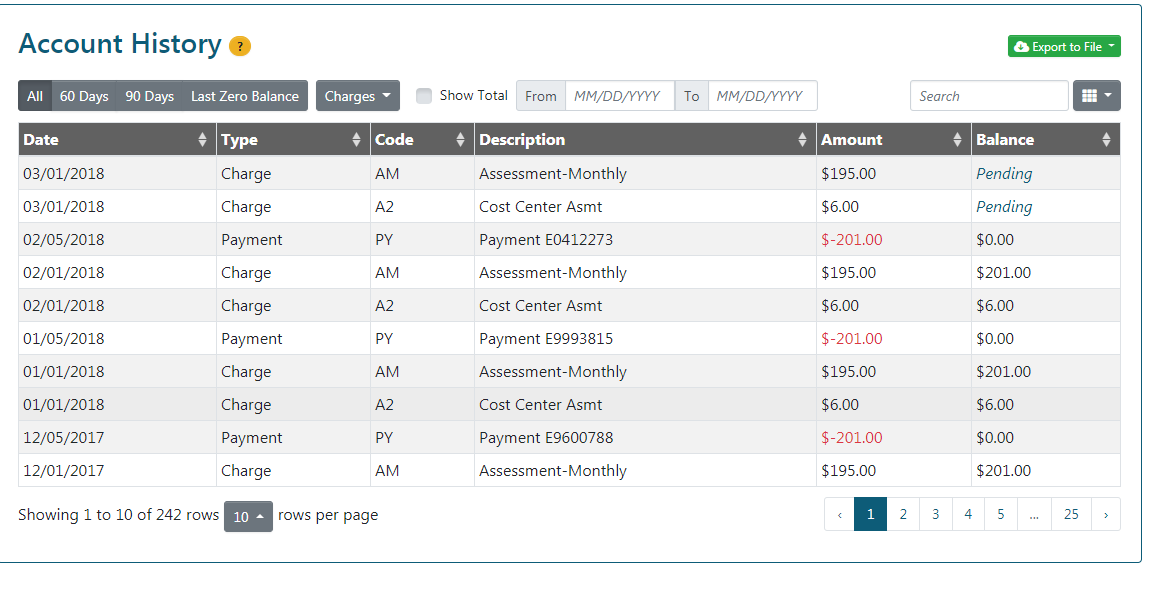
- A cost centers may also be set up so that specific amenity expenses can be tracked by the HOA (amenities that all H/O’s enjoy). For example, work orders for the pool, tennis court, and park may be opened under the cost center, while other work orders such as plumbing, roofing and exterior painting are opened under the HOA. Management App and the Profile should provide specific work order instructions for these types of cost centers.