How Non-Call Center staff can answer calls
Occasionally we have high call volume periods when additional phone coverage is necessary. These are instructions for individuals that are not trained Community Care team members to follow when answering calls.
Opening Call:
- “Good _______________(morning/afternoon/evening) this is ___________ (your name). May I please have the address you are calling about?”
If you are unable to assist say the following:
- “Unfortunately, we are currently experiencing a high call volume. May I please take down your information so that someone can return your call?”
- GATHER INFORMATION – Gather the following information from the caller and email to CCPriority@actionlife.com. If it is extremely urgent, please also send an EIO chat to a member of the Community Care team.
- Subject: Please put “Call Back” in the subject line
- Caller’s name
- Phone number
- Property address (if applicable)
- Association
- Detailed description of the caller’s question or concern
- RETURNING A CALL/INSISTENT CALLERS – If the caller is returning someone’s call or if they insist on being transferred to a particular individual, get the caller’s name (and as much info as possible per the “Gather Information” above), and then you may transfer them. Please stay on the line until the recipient picks up to confirm that the call is for them. If it goes to VM you may allow the caller to leave a VM.
- BOARD MEMBERS – If the caller identifies themselves as a board member, warm transfer only if EIO has a “+” sign as seen below.

“Hard Phone”

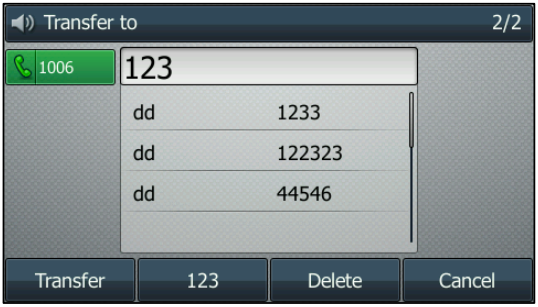
- Transfer a call – there are multiple Transfer buttons on your hard phone
- Cold Transfer (transfer a call without speaking to the person you are transferring a call to)
- Press one of the transfer buttons displayed above, Transfer or the Transfer soft key during a call.
- Enter the number you want to transfer the call to.
- Internal: 4 digit extension
- External: 9-1-xxx-xxx-xxxx
- Press one of the transfer displayed above, Transfer or the Transfer soft key to complete the transfer.
- Warm Transfer (to speak to the person you are transferring the call to before completing the transfer)
- Press one of the transfer buttons displayed above, Transfer or the Transfer soft key during a call.
- Enter the number you want to transfer the call to.
- Internal: 4 digit extension
- External: 9-1-xxx-xxx-xxxx
- Press the OK or # to dial out
- After the party answers the call, press one of the transfer buttons displayed above, Transfer or the Transfer soft key to complete the transfer.
- Cold Transfer (transfer a call without speaking to the person you are transferring a call to)