WARM TRANSFER VS. COLD TRANSFER
WARM TRANSFER – HOW
CALLS FOR THE OWNER OF ACTION
Warm Transfer vs. Cold Transfer
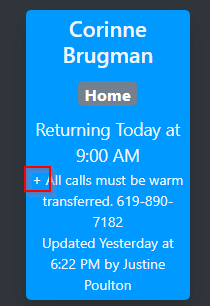
- For various reasons, calls for some Action employees should be announced to them before transferring. This is referred to as “warm transferring.” Cold transferring is simply sending a call to an extension without announcement. All employees who require warm transfer on every call have a “+” on their EIO status.
- As you hover the cursor over the name there will be a plus sign (+) located in the static comment area near the bottom. This indicates that you will need to warm transfer the call. (NOTE: Department Managers and Executives are not the only people who require warm transferring. Please warm transfer to anyone who has a “+” next to their name.)
Warm Transfer – How
- To warm transfer a call:
- Remain on the line until the call is answered
- Announce the caller name, company/association, and/or nature of call.
- If recipient does not answer or does not want to take the call, go back to the caller to let them know that the recipient is unavailable. Ask if they would like to leave a voicemail.
- If they wish to leave a voicemail, transfer the caller back to the extension and wait on the line until the voicemail picks up, then complete the transfer. Do not cold transfer the call back to the extension.
Calls for the owner of Action
- Occasionally callers will ask for the owner of Action Property Management*. These calls are usually from vendors trying to get on our Preferred Vendor List and they should be instructed to visit www.getvived.com/client/action to apply to become an approved vendor.
- If a caller must speak to the owner of Action, the call should be directed to Matthew Holbrook.
- *Jan Lhotka is the founder and former owner of Action Property Management.